Project 12 Digital Tilt Sensor
1. Introduction
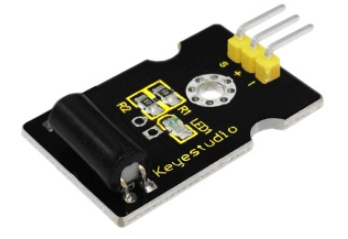
Tilt sensor is a digital tilt switch. It can be used as a simple tilt sensor. Tilt sensors (tilt ball switch) allow you to detect orientation or inclination. They are small, inexpensive, low-power and easy-to-use. Simply connect the sensor to our IO/Sensor shield, so you can make amazing interactive projects.
2. Specification
Supply Voltage: 3.3V to 5V
Interface: Digita
3. Connection Diagram
4. Sample Code
int ledPin = 13;                // Connect LED to pin 13
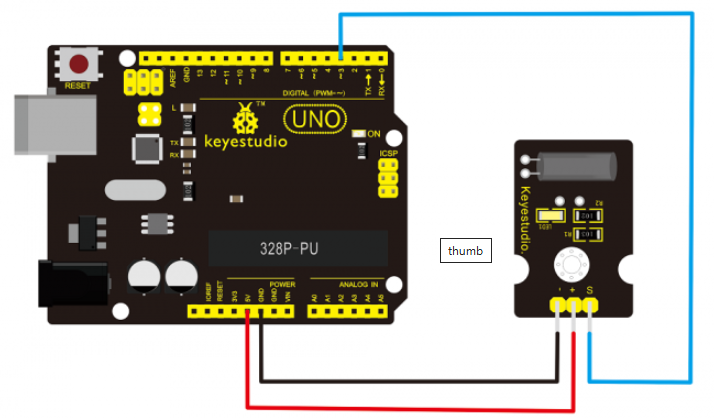
int switcher = 3;                 // Connect Tilt sensor to Pin3

void setup()
{
  pinMode(ledPin, OUTPUT);      // Set digital pin 13 to output mode
  pinMode(switcher, INPUT);       // Set digital pin 3 to input mode
}

void loop()
{

   if(digitalRead(switcher)==HIGH) //Read sensor value
   {
        digitalWrite(ledPin, HIGH);   // Turn on LED when the sensor is tilted
   }
   else
   {
        digitalWrite(ledPin, LOW);    // Turn off LED when the sensor is not triggered
   }
}
5. Result
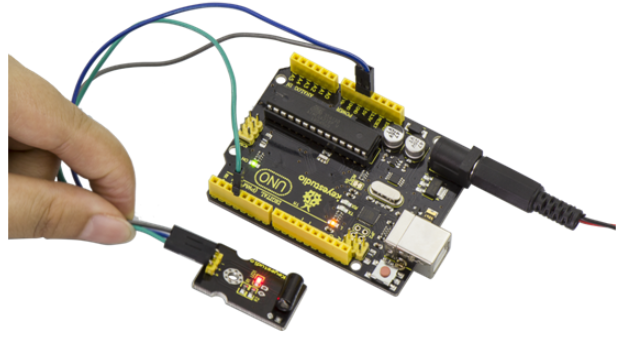
Upload the code to the board. Then tilt the sensor, you will see the led on the sensor is turned on. Shown as below.